On 27th October Music2Deal UK and Malta held a music showcase at the Captain’s Table restaurant on the tiny island of Gozo in the Mediterranean.
The venue was packed out to an extremely appreciative audience and we were incredibly pleased that Mario Christiani – Managing Director of Music2Deal came over specifically to attend the event and co-host with UK Music2Deal Managing Representative Richard Rogers.
The acts that played were particularly diverse and included artists from Malta, Scotland, Gozo and England.
The evening started off with a cracking set from Chris who sent the audience off with his exceptional falsetto delivery of various songs over the last 4 decades. This was followed by Gozitan band The Run who released a tight set of new numbers from their forthcoming rock album and proving that there is a lot of untapped talent on this small yet beautiful island.
Following this an excellent performance by the superbly under-rated Scottish pop act Kevin McGowan, mixing a heady mixture of self penned material and styles based on his love of artists such as The Beatles, The Kinks and Gerry Rafferty but still containing an excellent individual sound that the audience adored. Standout tracks were the forthcoming single ‘Hibernation’ and the recent hit ‘Stockholm’ with his band Racecar.
Filling in following a last minute dropout were Stevie D. and Les performing 8 tracks from their extensive repertoire that had parts of the audience lapping it up at the front of the stage. Next up was Maltese artist Indigo Darkpsych playing a goth metal rock mix of material from her first three albums including material from her recently released All That Remains album. Some decent songs, good mixing and a strong vocal ensured an excellent end to a wonderful evening of talented artists.
Mario Christiani spoke of the excellent blend of styles of the artists and recounted his thoughts of an wonderful evening of entertainment. In fact so good were all the artists that Mario and Richard have decided to give them all a free professional account on the Music2Deal site.
The Music2Deal Showcase in Gozo is just one of a series of showcases that have been put together over the years particularly in the UK and shows the commitment towards its members by Music2Deal.
Thank you to everyone for all their help and support and to the artists themselves for what was an amazing show.
I am a singer/songwriter (English Pop-Music) living in Munich/Germany. In the past I already had success with songs that I wrote for female artists – but also for my own, e.g. as only solo-artist and finalist in a music competition for the famous German TV station “ARD”. Two years ago I decided to work on my debut-album, which currently appeared on the 15th of November this year!
Why have you decided to become a member of Music2Deal?
First of all with “Won`t let you down” I wrote my first song for the album 2 years ago. Later I decided to look for a platform, where a) I could present this song a closed community of people working in the music area and b) furthermore do some networking. Soon I found “Music2Deal” and was positively surprised by the variety of different options that I was offered. So I decided to become a member and uploaded my song “Won`t let you down”.
You told us that you have made a really good deal on Music2Deal. Can you tell us more about it?
For the next 3 months “Won`t let you down” was ranked in the TOP 5 list of all songs due to the good votings by different members all over the world. I got very positive feedback and every day I made more new contacts. Then I used the search function looking for a label that was open for a newcomer. Later I got signed by 7us media group GmbH, an excellent label in Winnenden!
You released your debut album “Stars” on the 15th November. Are all songs written by yourself? How long have you been working on the album?
All in all it only took 1 year to have the songs written for my debut-album “Stars”. In this year we also produced my first video on the first single release “Won`t let you down”, which actually has > 22.000 clicks on YouTube! The song was released on 4th of October and already made it into the TOP 100 German radio mainstream charts! A really great start – further pushed through my label!
What are your plans for the future and your musical career?
My big target is to emotionally reach people all over the world with my songs, passion, my voice and the piano! Actually starting in Germany to enlarge my fanbase. So I am in contact with different booking agencies in order to get gigs. I am open for new requests and would also play as support act for famous artists. I can play solo – but also have a great band with professional musicians! Also, I am still searching for a music manager. If you are interested, you can send me an email (tothomas.rodenbach@gmx.de) or get in contact with me through Music2Deal!
You can also get more information about me on my Facebook fanpage:
David Jones from Mix Asylum (http://www.mixasylum.co.uk) here again to discuss another valuable production technique that you may not be aware of. Today’s topic is all about Logic Pro 9’s “Amp Designer”, so let’s get to it shall we?
What is “Amp Designer”?
Amp Designer is a process available in Logic Pro 9 that allows a guitar tone (or any tone if you wish), to be shaped so that it has the power and drive of a “real” guitar played through a professional amplifier. Power and depth plays a big part in recordings, so this program allows a dry recorded signal to give the impression it has been recorded through a Marshall Amplifier (or combinations thereof).
When I say “Marshall Amplifier” I mean Logic’s emulation of said amplifier, but do not let that put you off, the difference between a dry and affected signal can give you a vastly different sound (as the sound examples will testify), and will ultimately give you the “sound” you are looking for.
How do I find “Amp Designer”?
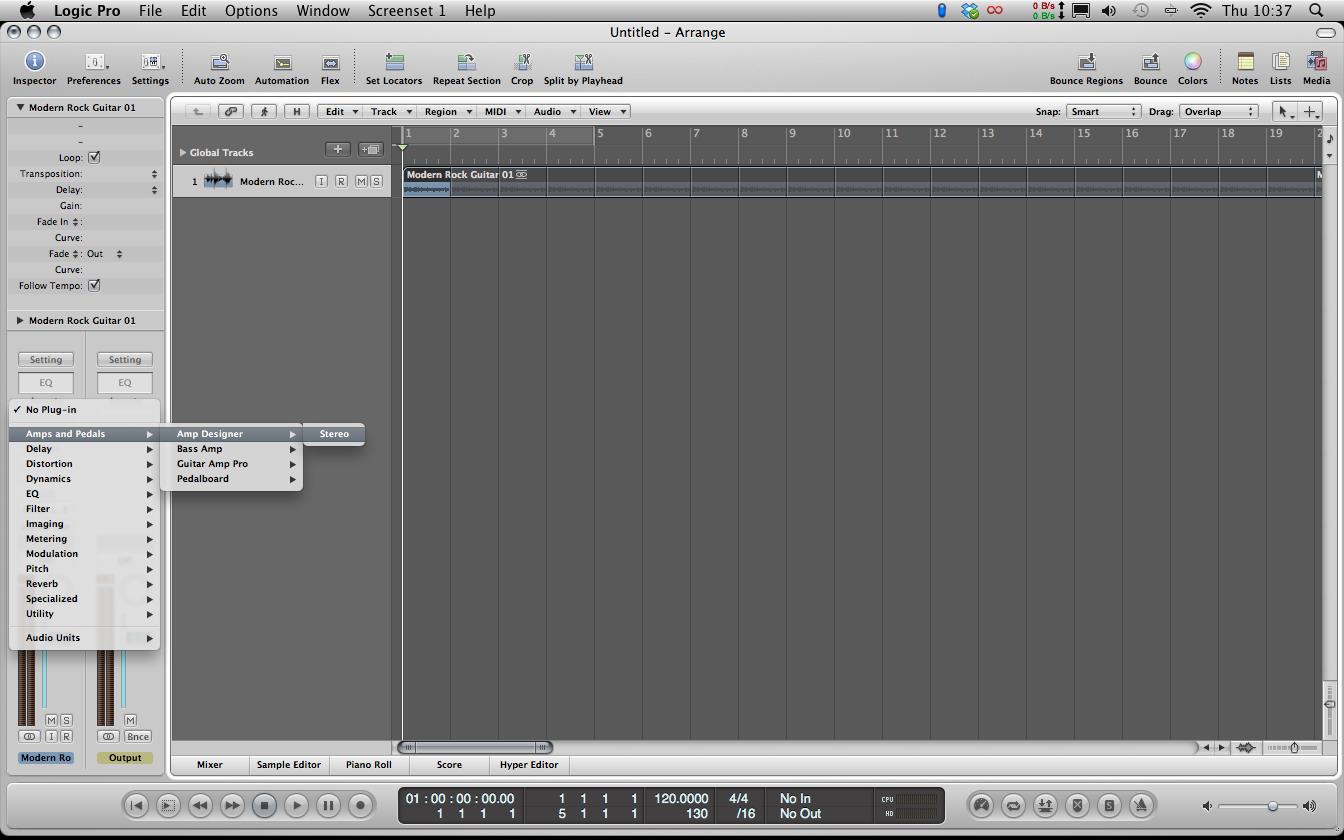
Locating Amp Designer is a very simple process and can be found like so:
On your channel strip, press a new insert and go the first option Amps & Pedals>Amp Designer
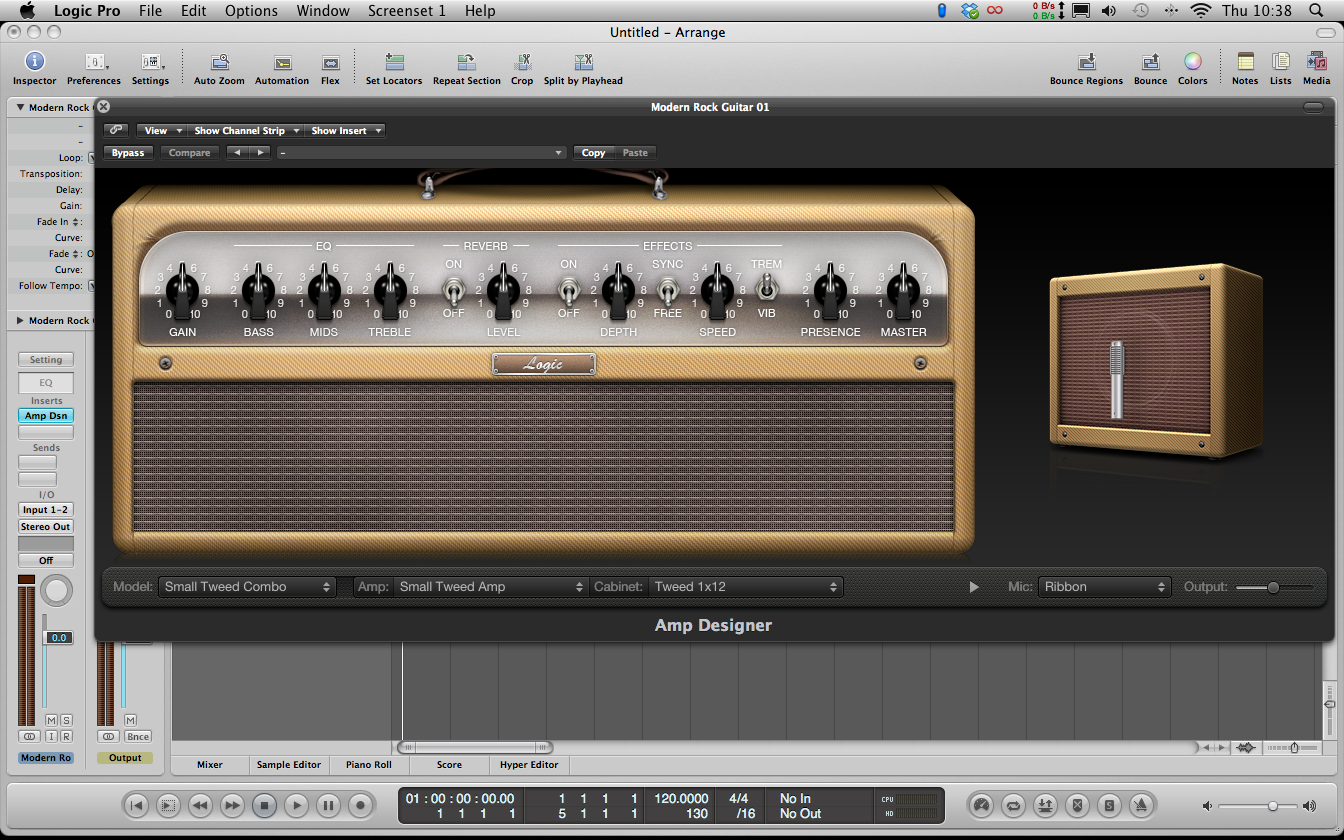
You will now be presented with this view:
Amp Designer in Logic Pro 9
How do I choose what Amplifier to use?
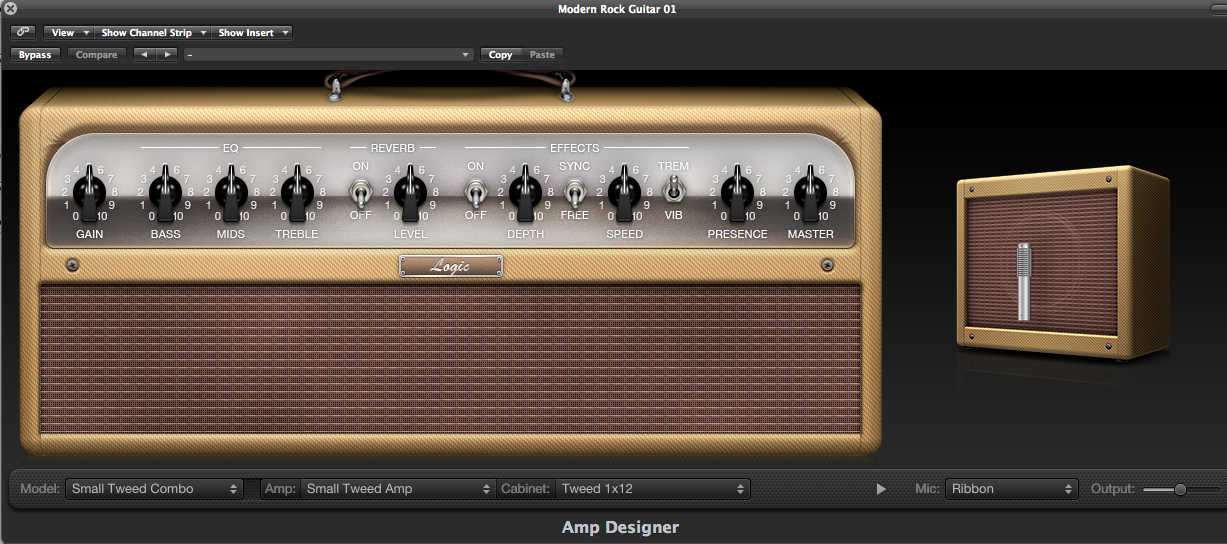
Closer view of Amp Designer
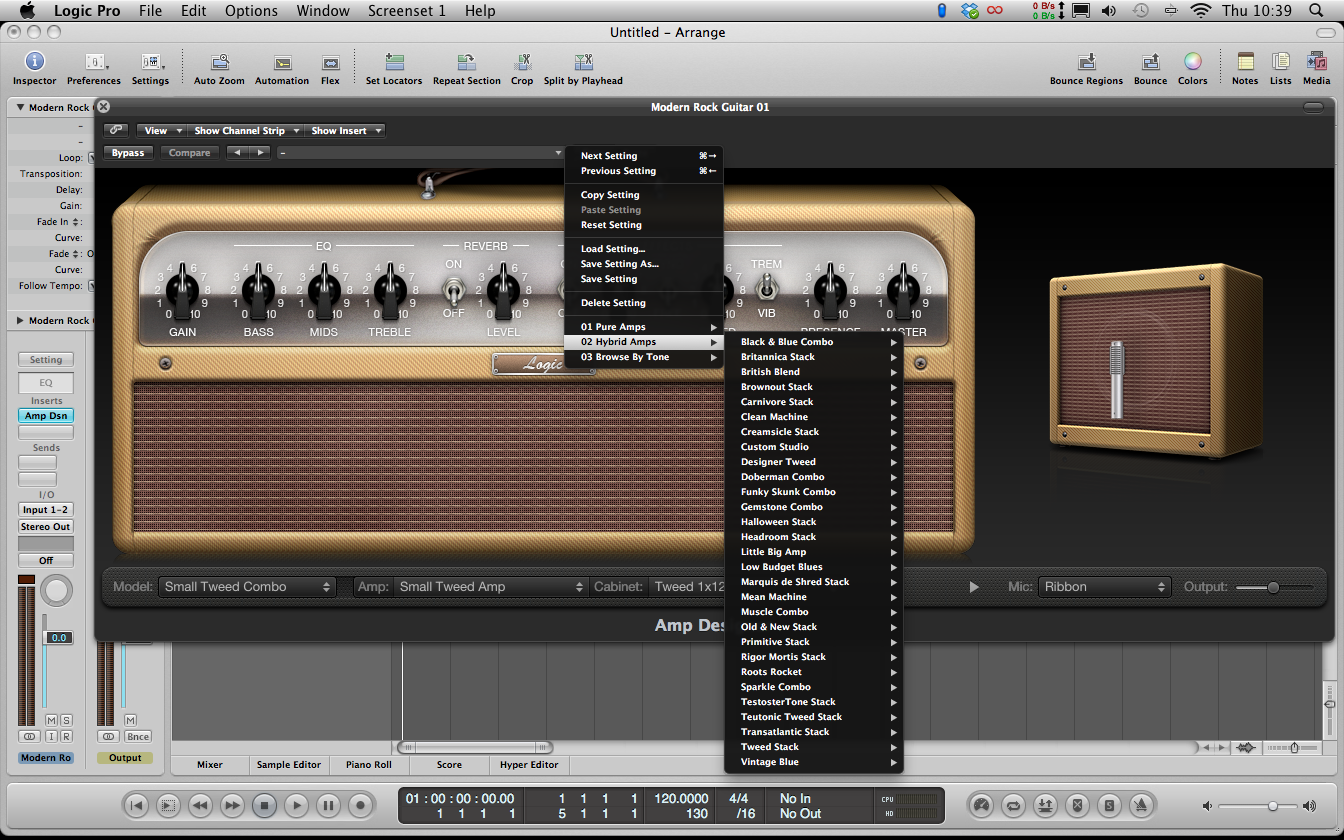
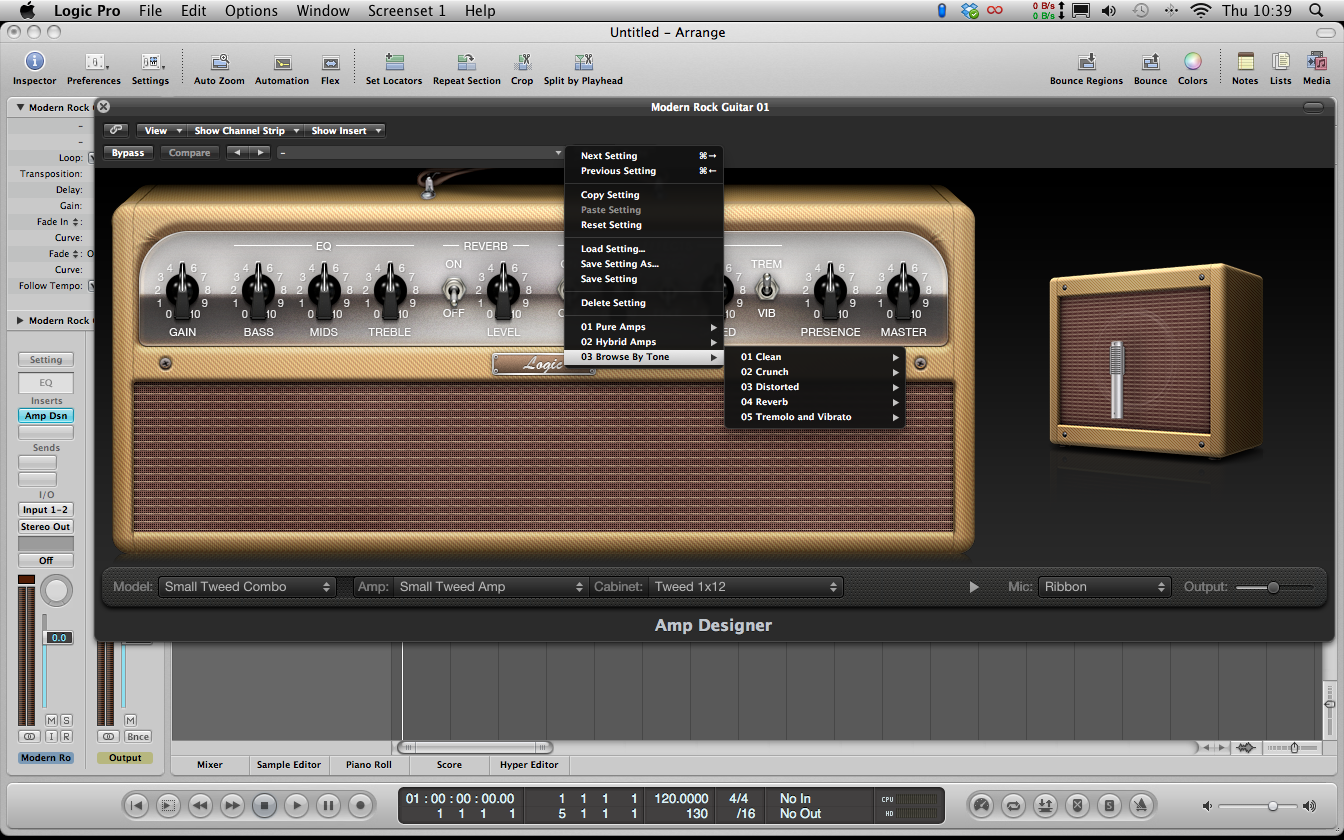
This is just the standard amplifier that is presented (called the “Small Tweed Combo”), which can be easily changed. To explore the many tones which Amp Designer has to offer, simply click on the top pull down menu (Direct left to the ‘Copy’ button).
As you can see, there are many different tones which you can experiment with to get that tone you’re after. There are three categories to choose from and these are:
01: Pure Amps
This category is for 1 tone amplifers (emiting a single sound tone for your signal). These include a “Large Blackface Combo”, a “Sunshine Stack” and many others for a harder type of guitar tone.
02: Hybrid Amps
As you might have guessed from the title, this category is for amplifers which have more than one sound characteristic and is more suitable for a cleaner type of tone. Tones in this category include “Clean Machine”, “Old and New Stack” etc.
03: Browse by Tone
If you haven’t already found your ideal sound from either category, the last menu lets a user define their own sound characterstic (such as Clean, Dirty etc), and again choices are presented:
The choice continues however, selecting the tone type is only half the story! When you’ve found your ideal type of amp, you can choose what type of sound you want from it. For example, if I chose ‘Large Blackface Combo’, I could choose different tonal varieties such as Clean, Crunch, Distort etc. This ultimately gives you even more control over how your dry signal will sound. As with anything though, experimentation is key when using technology like this.
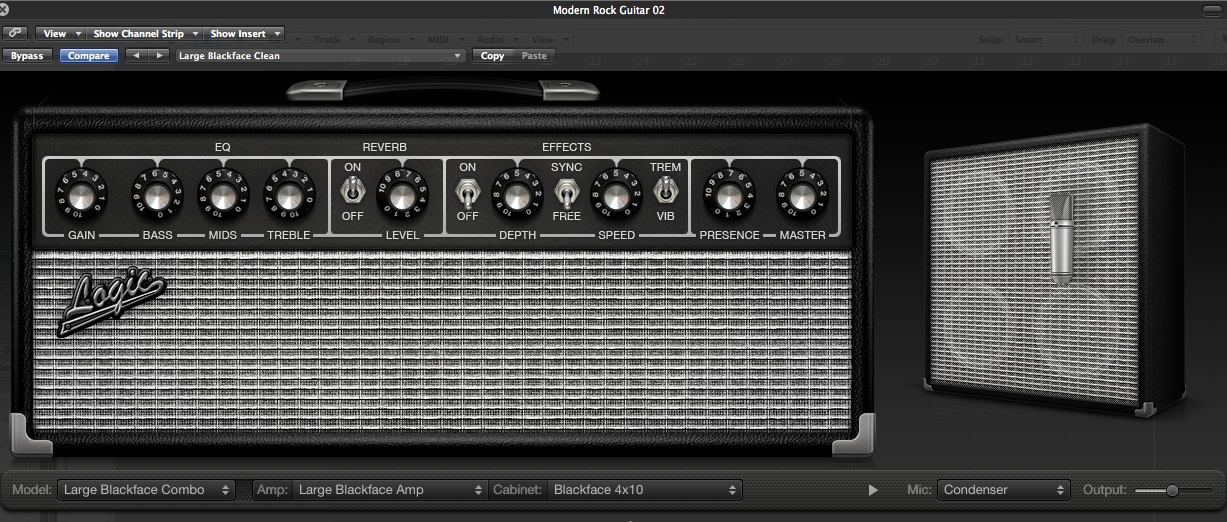
I should probably mention at this point that when you do select a new amplifer, this original interface will change automatically when you click a new choice. The ‘Large Blackface Combo’ amplifer looks like this for example:
How is Amp Designer used in practice?
Now that we’ve discussed how to find the amplifiers, how do we use them to affect our dry signal? For this part of the tutorial, I am going to be using the Large Blackface Combo, but the features mentioned are the same for every amplifier available. These are purely suggestions of using some features. What might be good for someone might not be good for another, so please use discretion.
You will automatically hear a difference in the sound of your signal just by adding a new amplifier to the signal path. If you don’t like what you’re hearing though (but think what you’re using is similar to the sound you want to hear) you can customise the sound of the amp by using one of two (or sometimes both!) methods:
Use the dials on the amplifier
It might sound an obvious solution, but altering some of the dials can radically alter the character of the amp. For example, if you want a grittier sound to your tone, try lessening the ‘treble’ dial of the EQ section, this reduces some of the high frequencies coming into the tone.
If you feel the tone could do with some more ‘space’ and ‘depth’, try adding some reverb to the amp by flicking/clicking the ‘ON’ switch (NOTE – Reverb will not work otherwise) and experimenting with the level.
Change the microphone to alter the amp’s character
Another useful feature of altering the sound characteristic of the amp could be to change the ‘recording’ microphone that is positioned on the amp. You can find this in the ‘Mic’ tab at the bottom half of the Amp Designer screen, and lets you choose between Condenser, Dynamic and Ribbon.
Condenser MicrophoneDynamic Microphone
You can also move the position of the microphones, as sometimes a particular cone of an amplifier can have a ‘sweet spot’ as such where the tone is outputted at optimum clarity. Again, please experiment with this (as this will vary for different amps) but to move the microphone position, all you have to do is hover over the name of the microphone and a photo of a speaker cone will appear:
Drag the white dot with your mouse, and the microphone will be moving along the speaker cone. You are limited in that the microphone only moves on the cone it is currently on (i.e. you can’t move it to the speaker cone underneath for example) but this should give you enough sound changing options.
For this example, I have moved the microphone in an extreme position to show you that it moves. Obviously, when doing this for real, experimentation is the key.
The Final Word
I hope this tutorial has given you lots of useful techniques on how to get that ‘perfect’ guitar tone you are after. There is lots of interaction with Amp Designer you can do, so please don’t be scared to try new things. Experimenting is what makes music so interesting!!!
As I just alluded to in the conclusion, my soundcloud account has before and after sound examples of just some of the different amps which are available in Amp Designer. Please check them out and hear for yourself what Amp Designer can do for you!!!







 The Music2Deal Blog