Article by David Jones / Mix Asylum
Today’s topic doesn’t so much relate to production techniques, but is about the final stage in the production chain, Mastering. It is perhaps something that people take for granted (“if I’ve got a good enough mix, the mastering engineer can fix it”) but it is in fact a much more delicate and important part of the production process than you might realise.
I’d like to share with you today what a mix should be sounding like sonically before you send it to the mastering engineer, and showing you if done right, how mastering can truly take your mixes to the next level. Let’s get to it, shall we?
The pre-master
The pre-master is your final stereo mix before any mastering takes place, but let’s think about some of the things your mix should have before you send it to someone:
- Does my mix have a good stereo balance? – Are the overall levels ok, or are things ‘jumping’ from loud to quiet? Does your mix sound like it has ‘space’ and sounds clear, or is everything squashed and fighting for that vital stereo image?
- Sonically, have I got the ‘sounds’ I want in my mix? – There is no ‘magic button’ for the mastering engineer to suddenly get your main guitar channel sounding like Angus Young for example. If your tone isn’t sounding as you want it, fix it in the mix. There is absolutely nothing the mastering engineer can do to sonically alter instrument/vocal sounds.
- Is my master channel level set right before bouncing off? – It might sound simple enough, but you would not believe the amount of mixes I have been sent through where the mix has been bounced off to such a high volume level, that there is absolutely nothing I can do to fix the track. Remember, mastering will make the output of the track louder, so if there is no headroom in the track before an engineer adds any effects, imagine how loud the track would be if someone attempted to add mastering to it….I shudder to think of the loudness to be honest. Always make sure your master channel is low enough so that the engineer has the headroom they need (somewhere around the -20dB mark would be best).
What is Mastering?
Now that we’ve looked at some of the requirements for a ‘good’ mix to send for mastering, let us now explore what exactly a mastering does to your song. A useful definition of the process comes below, courtesy of Tape Op Magazine:
“At its basic core, mastering is the process of making a cohesive, playable audio collection out of a group of recordings that may be less than consistent. After mastering you should be able to play the record without getting out of your chair to adjust the bass, treble, balance and volume controls as each song comes up. It should also be free of extraneous sounds – clicks and pops – that interfere with the experience of hearing the music. Beyond this mandate, there is an art to the process and every mastering engineer (ME) will do things a bit differently. But in order for these “masters” to arrive at the point where they can exercise their art, the bottom-line “cringe factors” of less-than-perfect recordings must be dealt with”.
[Acosta, A., Carroll, J., Stamey, C. (2008)]
Please take note of the passages in bold text. Although the first line may refer more specifically to albums, it reinforces my point earlier that your song should not have wild volume changes throughout it, as this constant changing of levels could make a listener ‘switch off’, which is something no one wants. Always keep this in mind when using automation processes.
Unwanted noise is also an issue to take note of. If your singer coughed half way through the guitar solo, make sure you remove this from your mix, as mastering will always highlight mistakes. It might give more of a ‘live’ vibe, but someone enjoying the music might be put off!!! In all seriousness though, take care of unwanted noise; it makes the mastering engineer’s job so much easier.
What does the mastering engineer do?
Obviously this all depends on the song in question, some songs may need more processing, others less. As a general rule though, the mastering engineer is likely to use/do the following on a track:
- Delay/Reverb (to add character to the mix)
- Appropriate fade in/out for song
This list could go on forever really; it does all depend on the source material that the engineer has to work with.
The basic role of the mastering engineer is to get the overall volume of the mix to a professional and acceptable standard, while making sure it has body and depth across the entire stereo spectrum, while making sure the levels do not exceed maximum limits. To say this role is a ‘juggling act’ is perhaps an understatement!!
What should my waveform look like before I get it mastered?
I hope so far this blog has given you some insight into just how much source material plays a crucial role into what the mastering engineer has to consider when mastering a song.
Let’s say that your mix ticks all of the boxes which we’ve discussed so far and you’re saying “David, I’ve got a great sounding mix, I think my levels are to a reasonable level, but how do I make sure?”
Well, this is where overall waveform levels are exceptionally important. I’d like to share with you now a few screenshots from some recent mixes I was sent to master, and what they sounded like.
This first song is called “Ghost Train” by Bruce Niemchick. Here is the original unmastered song which Bruce sent to me:

https://soundcloud.com/techniques-mixasylum/blog-6-mastering-grace-train
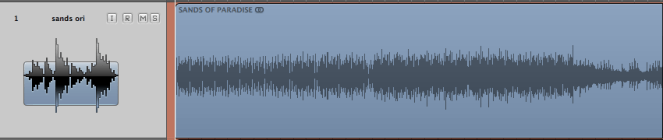
“Sands of Paradise” by HURSH
https://soundcloud.com/techniques-mixasylum/blog-6-mastering-sands-of
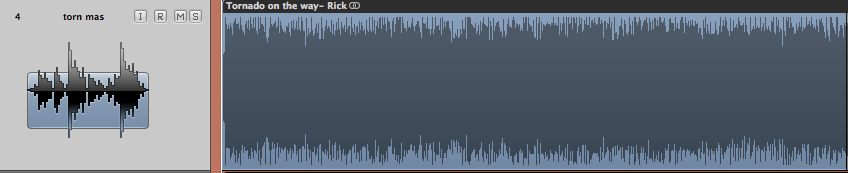
“Tornado on The Way” by Rick Ivanoff

https://soundcloud.com/techniques-mixasylum/blog-6-mastering-tornado-on
Please notice that the waveforms are to a very low level (you can tell this by the space between the lengths of the audio file region). Waveform’s like this are exactly what a mastering engineer needs in order to work their magic well, they have optimum headroom for effects and give the feeling of space and clarity which is just waiting to be exploited by the mastering engineer.
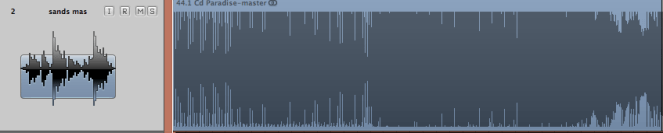
Now, here are the same waveforms again after they have been mastered (along with the new mastered audio):
“Ghost Train” by Bruce Niemchick

https://soundcloud.com/techniques-mixasylum/blog-6-mastering-grace-train-1
“Sands of Paradise” by HURSH
https://soundcloud.com/techniques-mixasylum/blog-6-mastering-sands-of-1
“Tornado on The Way” by Rick Ivanoff

https://soundcloud.com/techniques-mixasylum/blog-6-mastering-tornado-on-1
Please do take a look and listen to the un-mastered and mastered versions of these tracks. I hope they have conveyed that with some care and consideration how a good mix can turn into a fantastic master ready for distribution.
*All mastered and un-mastered tracks have been collated at the end of this blog so you can easily go between the two comparisons.
The Final Word
I hope this blog has gone some way to enlighten you to some of the techniques that can lead to an excellent sounding mastered song. Please try and remember that headroom is an incredibly important part of your mix, and try to ask yourself “has my mix got enough headroom for the mastering engineer?” before sending it to a paying engineer. Ask a friend/neighbour/housemate etc just to take a listen to your mix before you decide to send it, fresh ears always make a world of difference!!!
If you want to discuss anything about this blog, please feel free to get in touch with me via email at:
techniques-mixasylum@hotmail.co.uk or send a message through my facebook page at http://www.facebook.com/mixasylum
Any feedback is appreciated, good or bad, or even if you’ve got personal tips on how you prepare your mix before mastering, I’d love to hear from you.
Thanks, see you next time!
David Jones
Blog References
Acosta, A., Carroll, J., Stamey, C. (2008) Interviews > Mastering Focus. [Internet]. Available from: http://tapeop.com/interviews/68/mastering-focus/ [Accessed: 11th December 2013]
Audio Examples
Here are today’s audio examples collated into one section so it is easier to compare the differences between the mixes. Thank you to the artistes for allowing me to showcase their material.
“Ghost Train” song by Bruce Niemchick https://www.facebook.com/bruceniemchick
Original Unmastered version:
https://soundcloud.com/techniques-mixasylum/blog-6-mastering-grace-train
Mastered version by Mix Asylum:
https://soundcloud.com/techniques-mixasylum/blog-6-mastering-grace-train-1
“Sands of Paradise” song by HURSH
https://soundcloud.com/dj-rash-sinfobia
Original Unmastered version:
https://soundcloud.com/techniques-mixasylum/blog-6-mastering-sands-of
Mastered version by Mix Asylum:
https://soundcloud.com/techniques-mixasylum/blog-6-mastering-sands-of-1
“Tornado on The Way” song by Rick Ivanoff
http://www.rickivanoff.com
Original Unmastered version:
https://soundcloud.com/techniques-mixasylum/blog-6-mastering-tornado-on
Mastered version by Mix Asylum:
https://soundcloud.com/techniques-mixasylum/blog-6-mastering-tornado-on-1