Hello,
my name is David Jones and I am the founder and Producer for Mix Asylum a new post-production venture from the UK (http://www.mixasylum.co.uk). I’ve kindly been given permission by Sara Shirazi to write a number of guest blogs for Music2Deal and I hope you will find them useful. I am going to be talking about a range of software and techniques in future blogs, this first article being about Logic Pro’s “Match EQ” technique.
Where do I find “Match EQ?”
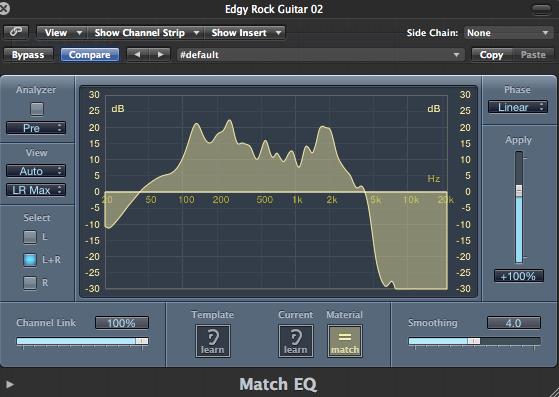
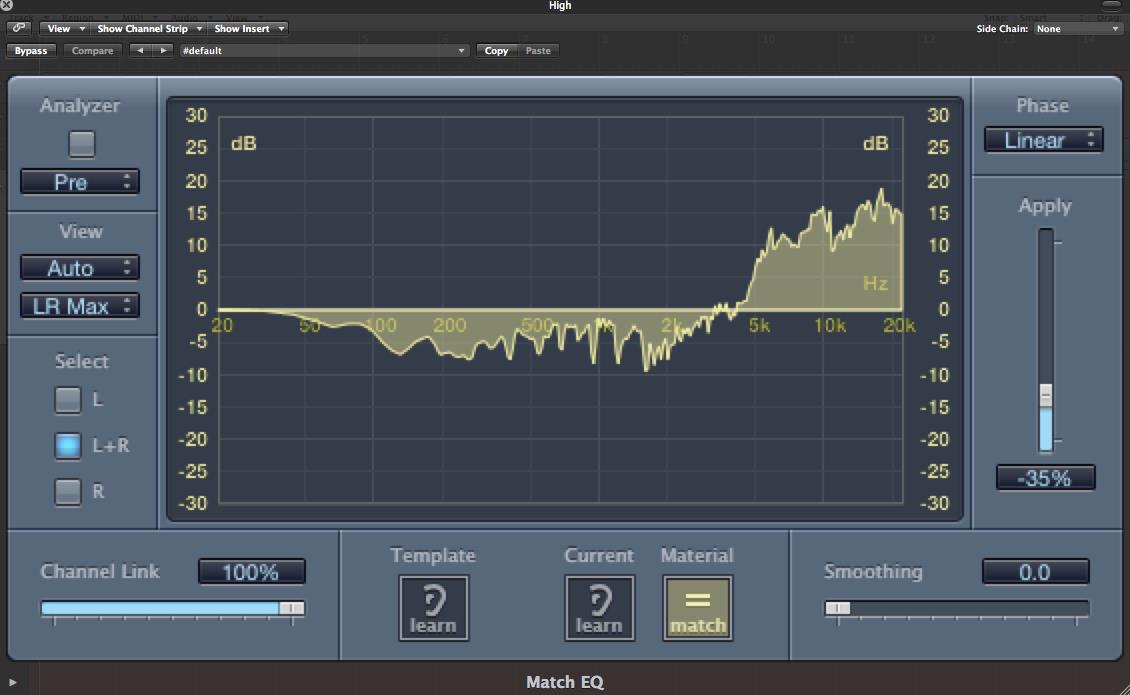
Match EQ is a process available in Logic Pro 9. It looks like this…

…and is found in Logic via the following way:
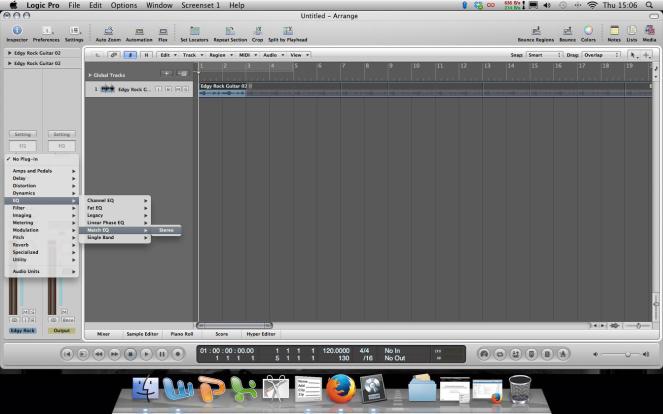 For this demonstration, I am using the “Edgy Rock Guitar 02” loop to show you the sound characteristics of Match EQ. Please take a listen to the audio link towards the bottom of the page so you can truly appreciate Match EQ:
What is “Match EQ?”
I’d first like to explore what Match EQ means to myself as a mixing engineer before a factual definition is applied.
Someone once said to me “Match EQ is for people who can’t EQ properly”. I think this is an unfair view of the process. I personally use Match EQ as a starting point on all of my mixes and would have difficulty without it. I use it as a tool to ‘sweep’ a soundsource(s) spectrum.
I do this so that I can hear what a source sounds like in extreme spectrums of EQ. When I talk about spectrum of EQ, I mean the lowest, bottom end frequency to the thinnest, high end frequency. Sometimes, I have a clear view in my minds eye of what I think a source should ‘sound’ like (whether it be a warm, low end definition, or a ‘sparkly’ high end tone) and I regularly use Match EQ to go to this idea first to see if my idea pays off. Sometimes I do get the right sound from mind to ear, but most times, Match EQ surprises and excites me with a sound I was not expecting, and it suddenly becomes a centre piece in a mix (where previously it might have been a subtle nuance).
Here is Apple’s description of Match EQ:
“Match EQ is a learning equalizer that analyzes the frequency spectrum of an audio signal such as an audio file, a channel strip input signal, or a template. The average frequency spectrum of the source file (the template) and of the current material (this can be the entire project or individual channel strips within it) is analyzed. These two spectra are then matched, creating a filter curve. This filter curve adapts the frequency response of the current material to match that of the template. Before applying the filter curve, you can modify it by boosting or cutting any number of frequencies, or by inverting the curve”.
[Apple Inc, no date].
I’ll discuss the ‘matching’ information shortly…
How do I use “Match EQ?”
The process of using Match EQ is incredibly simple, and works like this:
1. With the audio file you wish to process playing, press ‘Template Learn’
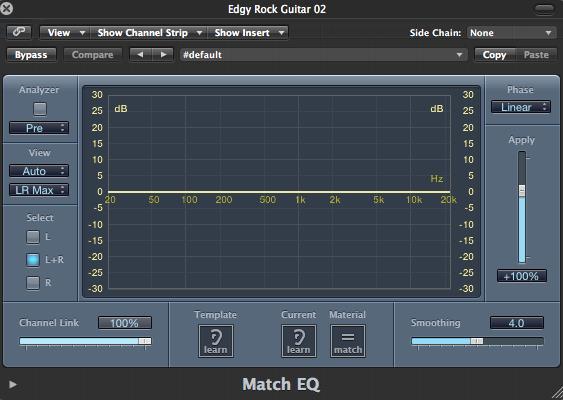
2. The Audio file is now being processed by ‘Match EQ’
 3. VERY IMPORTANT – ALWAYS stop the audio file playing, as the sound will now be altered to the deepest, lowest-end frequency and it is outputted at a very loud volume because of this. Your ears will thank you, believe me!!!!
4. With the audio file stopped playing, press ‘Match’
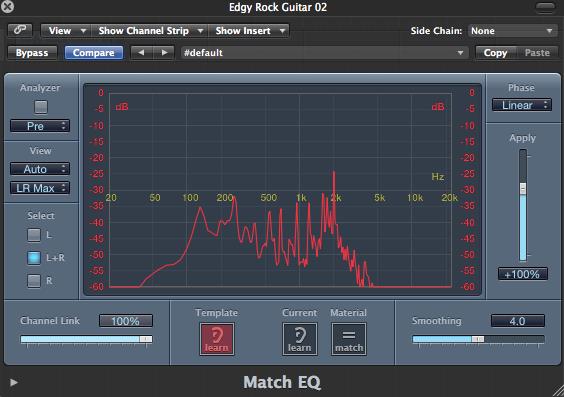 5. The EQ spectrum for the audio file is now outputted.
 6. Manipulate the ‘Apply’ Lever to shape the sound of your source
 That really is all there is to it, now it’s up to your ears to do the hard work!
How is “Match EQ?” used to shape my mix?
Remember earlier when I mentioned about matching a sound source? If the above wasn’t already useful to your soundsources, Match EQ has a great trick that can really take your mix to the next level!
Say you’ve now got a perfect guitar shape/EQ tone that you want to use across your other guitars, but you don’t want the hassle of trying to exactly replicate the process just in case something goes wrong? No problem! Simply press ‘copy’ on your original Match EQ window, open a new Match EQ on your 2nd guitar (for example), press ‘paste’ and there you have it, an exact duplication of your settings.
You might now be saying “David, this is all well and good, but why would I want duplicates?” On guitar for example, it could be useful to form a ‘bed’ of guitar layers, and obviously having the same EQ tones would make them sound like a ‘wall’ for the mix.
Drums are also a very good use for Match EQ, sometimes I use different ‘tones’ to help shape my snare so that it has more realism of the bottom and top end of the hit. Kick drums also have more depth to them with Match EQ applied.
Basically, if you just want some consistency to a mix, look no further than Match EQ. Obviously, more processing may be needed on the signal as a whole for a full instrument mix, but it is a very useful and creative starting point that I wholeheartedly recommend.
Match EQ sound examples
Now I’ve discussed the principles of Match EQ, why don’t we have a listen to some of its sound shaping characteristics? Before that though, let me just explain how I set-up this demonstration.
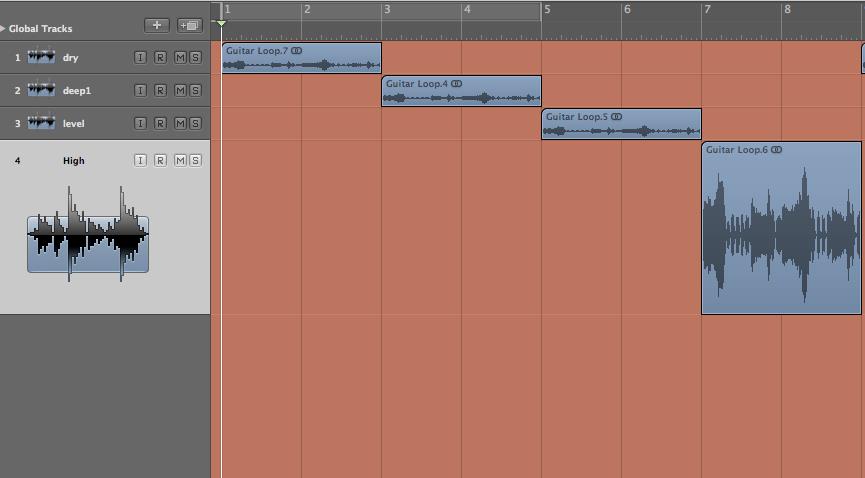
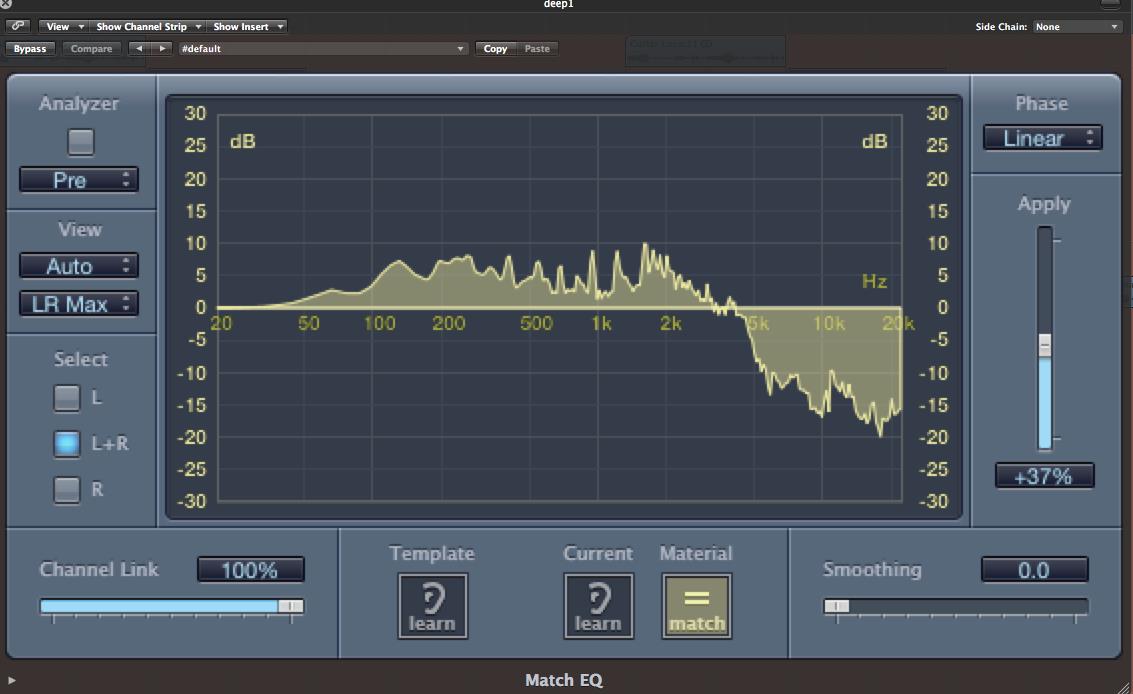
I imported the original dry, unprocessed “Edgy Rock Guitar 02” into Logic Pro 9, which by itself is a bar lasting for four seconds. I made three duplicate channels spaced equally apart (the dry loop starts at 0:00 – 0:04, a deeper EQ loop starts at 0:05 – 0:08 etc) and each three duplicates have a different EQ characteristic, as shown in these screenshots:
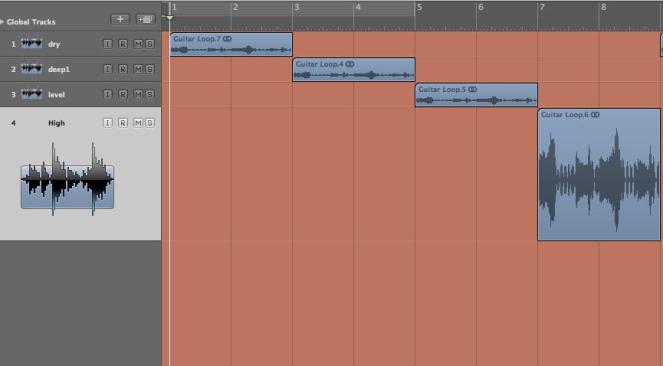 Loop 1 is unprocessed.
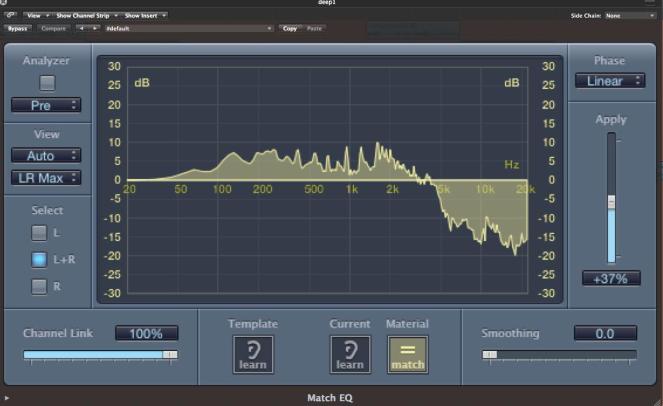 A deeper form of EQ for loop 2, enhancing more of the bass frequencies around -15dB.
 Loop 3 – This EQ setting has more of an even setting across the frequency spectrum, which means not one particular frequency band is prominent in the sound.
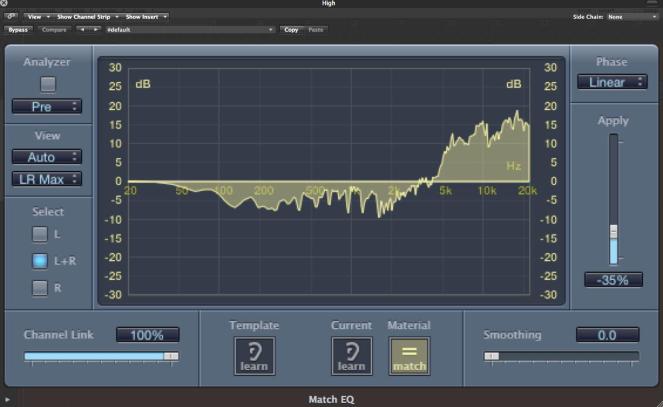 Loop 4 – The high frequencies of the guitar are now more prominent, giving the tone a ‘bright’ type of sound.
Each sample lasts for 0:04 seconds each, but I have duplicated these tracks three times, meaning the total playing time of the audio file is 0:49 seconds.
Please take a listen to the following demonstration of what Match EQ can do for your tracks!
https://soundcloud.com/techniques-mixasylum/match-eq-demonstration
The final word
I hope I’ve shown through the audio example above how much scope you can achieve on your soundsource through using Match EQ. In my eyes, it gives a user much more chance to experiment within the wider sound spectrum without necessarily altering the sound to cater for this at the recording stage, allowing your dry files to be just that – original files which can be further enriched at the mixing stage.
The sound examples are obviously taken from the extremes of the stereo spectrum for this example; the main focus for Match EQ is personal experimentation, there is no right or wrong way to EQ a particular sound, just let your imagination loose and see where it goes!
If you want to discuss anything about this blog, please feel free to get in touch with me via email at: techniques-mixasylum@hotmail.co.uk or send a message through my facebook page at http://www.facebook.com/mixasylum
Any feedback is appreciated, good or bad, or even if you’ve got personal tips on how you use Match EQ, I’d love to hear from you.
Also remember to check out my soundcloud for future demonstrations of production techniques:
https://soundcloud.com/techniques-mixasylum
Thanks, look out for my next blog!
David Jones
http://www.mixasylum.co.uk

 3. A menu pops up where you can name your playlist (and other details) where the file will go in iTunes. Press Share, and the track begins to export.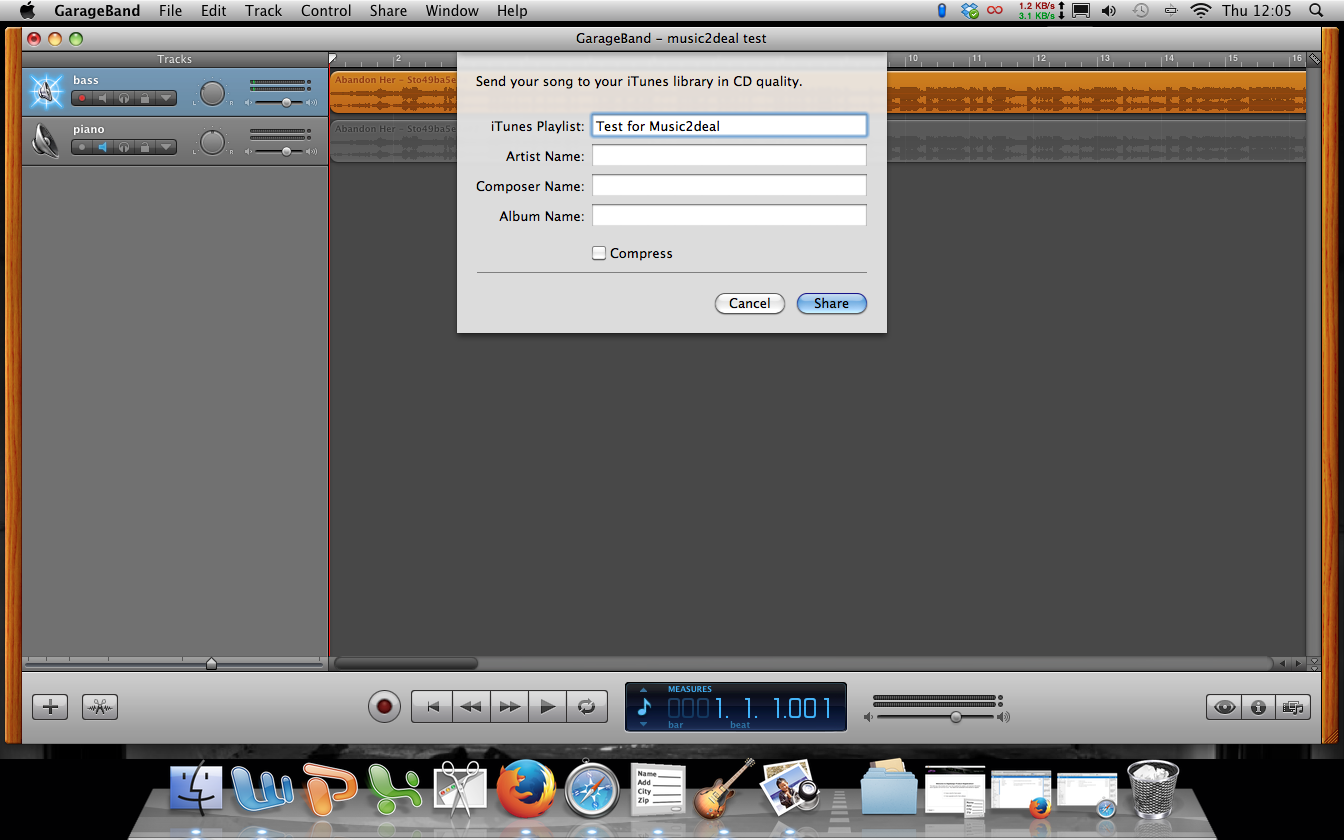
 5. Click on the playlist, and it will open, showing the track(s) that have just been bounced. As you can see, the track defaults to the same name as the playlist. It is best to rename your tracks as you bounce them, as you would probably get confused with 20 tracks all called the same thing!
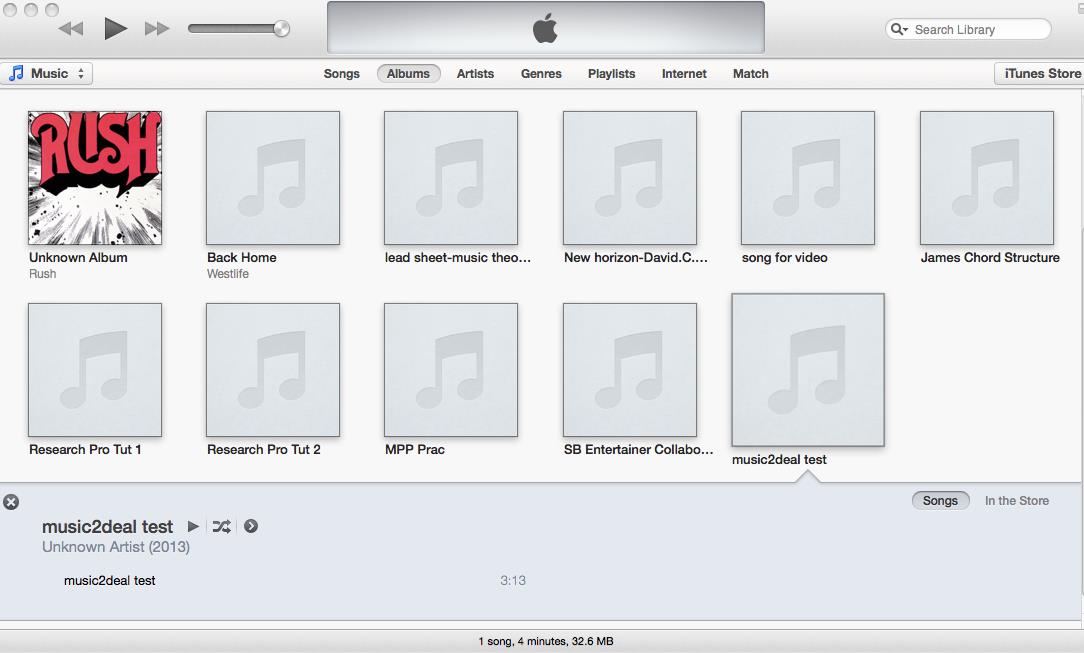 6. Click on the name of the track until a cursor appears. This lets you be able to change the name of the individual track. When you’ve renamed it, press enter on your keyboard.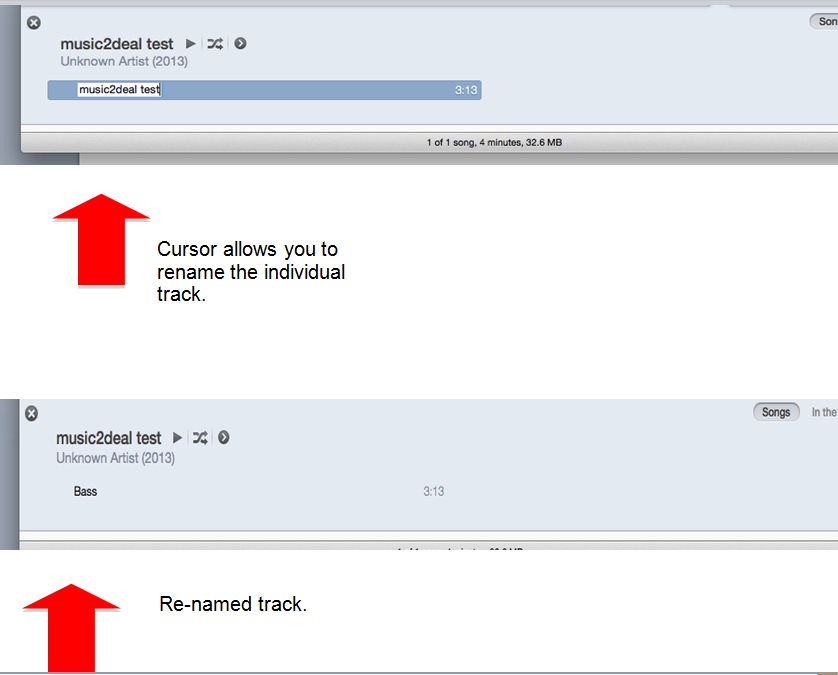




 The Music2Deal Blog